¶ Introduction
n this room, you will learn about Session Management. Thinking about your interactions with web applications, you should realise that you do not provide a web application with your username and password on every request. Instead, after authentication, you are provided with a session. This session is used by the web application to keep your state, track your actions, and decide whether or not you are allowed to do what you are trying to do. Session management aims to ensure that these steps are performed correctly. Otherwise, it may be possible for a threat actor to compromise your session and effectively hijack it!
Prerequisites
Learning Objectives
- Understand what Session Management is
- Understand the differences between authentication and authorisation and how they each play a role in session management
- Learn about the two main session management methods
- Learn about the session management lifecycle
- Learn how to practically exploit vulnerable session management implementations
¶ What is Session Management?
Before we discuss everything that can go wrong, we need to learn about session management. As mentioned in the previous task, you don't send your username and password with each request. However, the HTTP protocol is inherently stateless. Sessions are, therefore, used to track users throughout their use of a web application. Session management is the process of managing these sessions and ensuring that they remain secure.
Session Management Lifecycle
The best way to learn about session management is to use the session management lifecycle, as shown in the animation below.
Session Creation
You might think this first step in the lifecycle occurs only after you provide your credentials, such as a username and password. However, on many web applications, the initial session is already created when you visit the application. This is because some applications want to track your actions even before authentication. However, our main focus for this room will be on authenticated sessions. Once you provide your username and password, you receive a session value that is then sent with each new request. How these session values are generated, used, and stored is crucial in securing session creation.
Session Tracking
Once you receive your session value, this is submitted with each new request. This allows the web application to track your actions even though the HTTP protocol is stateless in nature. With each request made, the web application can recover the session value from the request and perform a server-side lookup to understand who the session belongs to and what permissions they have. In the event that there are issues in the session tracking process, it may allow a threat actor to hijack a session or impersonate one.
Session Expiry
Because the HTTP protocol is stateless, it may happen that a user of the web application all of a sudden stops using it. For example, you might close the tab or your entire browser. Since the protocol is stateless, the web application has no method to know that this action has occurred. This is where session expiry comes into play. Your session value itself should have a lifetime attached to it. If the lifetime expires and you submit an old session value to the web application, it should be denied as the session should have been expired. Instead, you should be redirected to the login page to authenticate again and start the session management lifecycle all over again!
Session Termination
However, in some cases, the user might forcibly perform a logout action. In the event that this occurs, the web application should terminate the user's session. While this is similar to session expiry, it is unique in the sense that even if the session's lifetime is still valid, the session itself should be terminated. Issues in this termination process could allow a threat actor to gain persistent access to an account.
In this room, we will look at what can go wrong in each of these session states. We want to ensure that session security encapsulates the entire lifecycle. However, we first need to cover a bit more theory.
¶ Authentication vs Authorisation
To understand the common vulnerabilities in session management, we first need to examine authentication and authorisation. While they sound the same and are often confused, each plays a critical and unique role in session management. To better explain the differences, let's examine the IAAA model:

¶ Identification
Identification is the process of verifying who the user is. This starts with the user claiming to be a specific identity. In most web applications, this is performed by submitting your username. You are claiming that you are the person associated with the specific username. Some applications use uniquely created usernames, whereas others will take your email address as the username.
¶ Authentication
Authentication is the process of ensuring that the user is who they say they are. Where in identification, you provide a username, for authentication, you provide proof that you are who you say you are. For example, you can supply the password associated with the claimed username. The web application can confirm this information if it is valid; this is the point where session creation would kick in.
¶ Authorisation
Authorisation is the process of ensuring that the specific user has the rights required to perform the action requested. For example, while all users may view data, only a select few may modify it. In the session management lifecycle, session tracking plays a critical role in authorisation.
¶ Accountability
Accountability is the process of creating a record of the actions performed by users. We should track the user's session and log all actions performed using the specific session. This information plays a critical role in the event of a security incident to piece together what has happened.
¶ IAAA and Session Management
Now that you understand the differences between authentication and authorisation let's bring this back to session management. Authentication plays a role in how sessions are created. Authorisation becomes important to verify that the user associated with a specific session has the permission to perform the action they are requesting. Accountability is crucial for us to piece together what actually occurred in an incident, which means it is important that requests are logged and that the session associated with each request is also logged.
¶ Cookies vs Tokens
The last topic to cover before diving into session management security is the type of sessions being used. The two main approaches are cookies and tokens, each with its own benefits and drawbacks.
Cookie-Based Session Management
Cookie-based session management is often called the old-school way of managing sessions. Once the web application wants to begin tracking, in a response, the Set-Cookie header value will be sent. Your browser will interpret this header to store a new cookie value. Let's take a look at such a Set-Cookie header:
Set-Cookie: session=12345;
Your browser will create a cookie entry for a cookie named session with a value of 12345 which will be valid for the domain where the cookie was received from. Several attributes can also be added to this header. If you want to learn more about all of them, please refer here, but some of the noteworthy ones are:
- Secure - Indicates to the browser that the cookie may only be transmitted over verified HTTPS channels. If there are certificate errors or HTTP is used, the cookie value will not be transmitted.
- HTTPOnly - Indicates to the browser that the cookie value may not be read by client-side JavaScript.
- Expire - Indicates to the browser when a cookie value will no longer be valid and should be removed.
- SameSite - Indicates to the browser whether the cookie may be transmitted in cross-site requests to help protect against CSRF attacks.
A key thing to remember with cookie-based authentication is that the browser itself will decide when a certain cookie value will be sent with a request. After reviewing the domain and the attributes of the cookie, the browser makes this decision, and the cookie is attached automatically without any additional client-side JavaScript code.
Token-Based Session Management
Token-based session management is a relatively new concept. Instead of using the browser's automatic cookie management features, it relies on client-side code for the process. After authentication, the web application provides a token within the request body. Using client-side JavaScript code, this token is then stored in the browser's LocalStorage.
When a new request is made, JavaScript code must load the token from storage and attach it as a header. One of the most common types of tokens is JSON Web Tokens (JWT), which are passed through the Authorization: Bearer header. However, as we are not using the browser's built-in cookie management features, it is a bit of the wild west where anything goes. Although there are standards, nothing is really forcing anything from sticking to these standards.
Benefits and Drawbacks
The benefits and drawbacks of each of these methods are directly related, so let's take a look:
| Cookie-Session Management |
Token-Based Session Management |
| Cookie is automatically sent by the browser with each request |
Token has to be submitted as a header with each request using client-side JavaScript |
| Cookie attributes can be used to enhance the browser's protection of the cookie |
Tokens do not have automatic security protections enforced and should, therefore, be safeguarded against disclosures |
| Cookies can be vulnerable to conventional client-side attacks such as CSRF, where the browser is tricked into making a request on behalf of the user. |
As the token is not automatically added to any request and cannot be read from LocalStorage by other domains, conventional client-side attacks such as CSRF are blocked. |
| As cookies are locked to a specific domain, it can be difficult to use them securely in decentralised web applications. |
Tokens work well in decentralised web applications, as they are managed through JavaScript and can often contain all the information required to verify the token itself. |
¶ Securing the Session Lifecycle
It is finally time to learn about session management security. Going back to our session management lifecycle, let's examine what can go wrong at each phase.
¶ Session Creation
Session creation is where the most vulnerabilities can creep in. Let's dive into a couple of the common ones.
Weak Session Values
It is less common to see weak session values in modern times as frameworks are consistently used. However, with the rise of LLMs and other AI code-assistant solutions, you would be surprised at how often these old-school vulnerabilities are creeping back in.
If a custom session creation mechanism has been implemented, there is a good chance that the session values may be guessable. A good example of this is a mechanism that simply base64 encodes the username as the session value. If a threat actor can reverse engineer the session creation process, they can generate or guess session values to hijack the accounts of legitimate users.
Controllable Session Values
In certain tokens, such as JWTs, all the relevant information to both create and verify the JWT's validity is provided. If security measures are not enforced, such as verifying the token's signature or ensuring that the signature itself was created securely, a threat actor would be able to generate their own token. These types of attacks will be discussed in more detail in a future room.
Session Fixation
Remember the web application that already gave you a session before authentication? These web applications can be vulnerable to something called session fixation. If your session value is not adequately rotated once you authenticate, a suitably positioned threat actor could record it when you are still unauthenticated and wait for you to authenticate to gain access to your session.
Insecure Session Transmission
In modern environments, it is common for the authentication server and the application servers to be distinct. Think about things like Single Sign-On (SSO) solutions. One application is used for authentication to several other web applications. In order for this process to work, your session material must be transferred from the authentication server to the application server via your browser. In this transmission, however, certain issues can creep in that would expose your session information to a threat actor. The most common is an insecure redirect where the threat actor can control the URL where you will be redirected to post-authentication. This could allow the threat actor to hijack your session. This isn't just with custom implementations, Oracle's SSO solution had a massive bug that allowed for this to happen.
¶ Session Tracking
Session tracking is the second largest culprit of vulnerabilities. Let's take a look.
Authorisation Bypass
Authorisation bypasses occur when there aren't sufficient checks being performed on whether a user is allowed to perform the action they requested. In essence, this fails to track the user's session and its associated rights correctly. It is also worth talking about the two types of authorisation bypasses:
- Vertical bypass - You can perform an action that is reserved for a more privileged user
- Horizontal bypass - You can perform an action you are allowed to perform, but on a dataset that you should not be allowed to perform the action on
In most applications, vertical bypasses are easy to defend against since function decorators and path-based access control configurations are used. However, with horizontal bypasses, the user is performing an action that they should be allowed to perform. The issue is that they are performing it on someone else's data. To remedy this, actual code is required to verify who the user is (extracted from their session), which data they are requesting, and if they are allowed to request or modify the dataset.
Insufficient Logging
A key issue during incidents is not having sufficient information to piece together an attack. While a lot of logging will occur at an infrastructure level, application logging can be crucial to understanding what went wrong. In the event that the actions performed by a specific session and the ability to retrace that session to a user do not exist, it can leave gaps in the investigation that cannot be filled. It is also worth making sure that logs cover both accepted and rejected actions. In the event of a session hijacking attack, the actions would appear legitimate. Therefore, simply logging rejected actions is not sufficient to paint the picture.
¶ Session Expiry
Session expiry only has a single vulnerability, which is when the expiry time for sessions are excessive. A session should be seen as a ticket to a movie. Each night, the same movie is shown, but we don't want someone to be able to use the same ticket to watch the movie again. The same counts for sessions, we need to make sure that our session expiry time takes into consideration our specific application's use case. A banking application should have a shorter session lifetime than your webmail client.
Furthermore, in the event of long-life sessions, such as those for a webmail client, the session itself should attest to the location where it is used. If this location changes (which could be an indication of session hijacking), the session should be terminated.
¶ Session Termination
For session termination, the key issue is when sessions are not properly terminated server-side when the logout action is performed. Suppose a threat actor were to hijack a user's session. In that case, even if the user became aware of the issue, without the ability to invalidate the session server-side, there isn't a method for the user to flush the access of the threat actor. However, this can be quite an issue for tokens where the lifetime of the token is embedded in the token itself. In these cases, the token can be added to a blocklist to be verified against. Some applications also take this further where all the sessions of the user can be viewed and terminated. Furthermore, upon a successful password reset, it is also recommended that all sessions are terminated to allow a user to regain full control of their account.
¶ Exploiting Insecure Session Management
Leveraging the knowledge you have gained, it is time to explore how the session management lifecycle can be mapped out and tested. Start the machine by pressing the Start Machine button at the top of this task, and let's get hacking! You may access the VM using the AttackBox or your VPN connection.
¶ Enumeration
To effectively exploit a vulnerable session management lifecycle, we first need to map out the lifecycle for ourselves and capture detailed notes. Once we understand the intended lifecycle, we can start looking for weaknesses. We will be using the built-in browser tools for this demonstration. However, you can also follow along with more advanced web application testing tools, such as Burp. Let's navigate to our application at http://MACHINE_IP first, and we should see the following page:
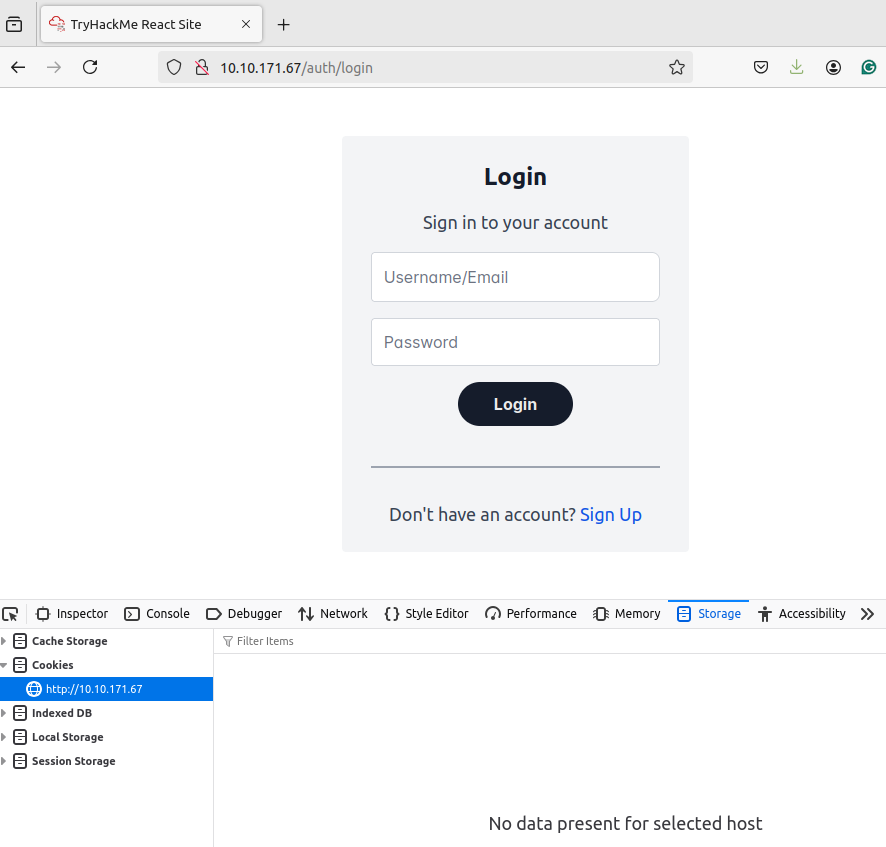
We first notice that we are not presented with any cookies or tokens when we first visit the page. This tells us that unauthenticated sessions are most likely not being tracked. If we click the Sign-Up button, we see that there are two main signups:
- Student - This can be used by anyone to create a profile
- Lecturer - Requires a verification code for the signup process
This shows us that even without any brute-force techniques, we can kick off the session management lifecycle by creating a student account. Let's create a student account and see what happens:
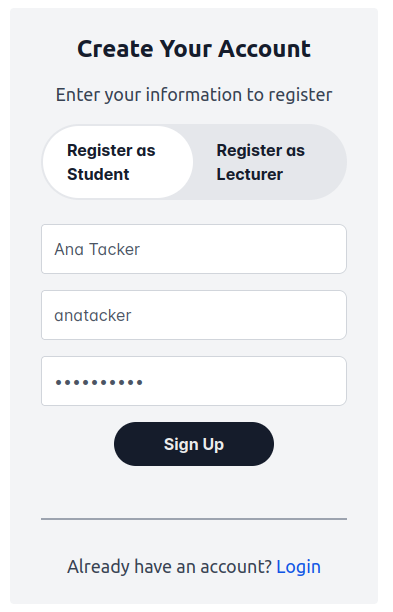
After creating the user account, we receive a prompt that the account has been created, and we are navigated back to the login page. Let's perform a login as our user and monitor the network traffic:
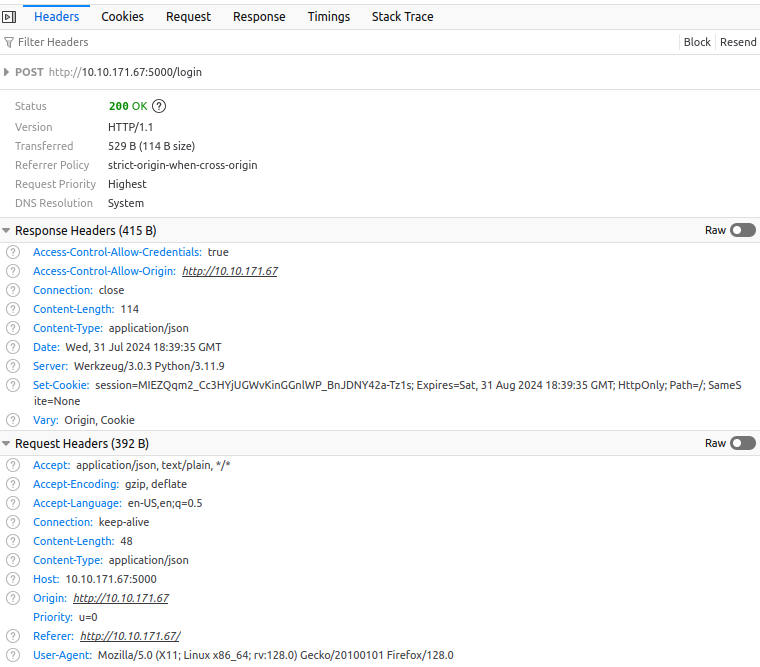
This tells us quite a bit of information:
- Cookies are being used for session management.
- The HTTPOnly flag is set which means we would not be able to leverage JavaScript to read the cookie value.
- The cookie expiry time seems weird since both the creation and expiry times for the cookie are the exact same.
With this authentication, we also notice that we now have access to more functionality:
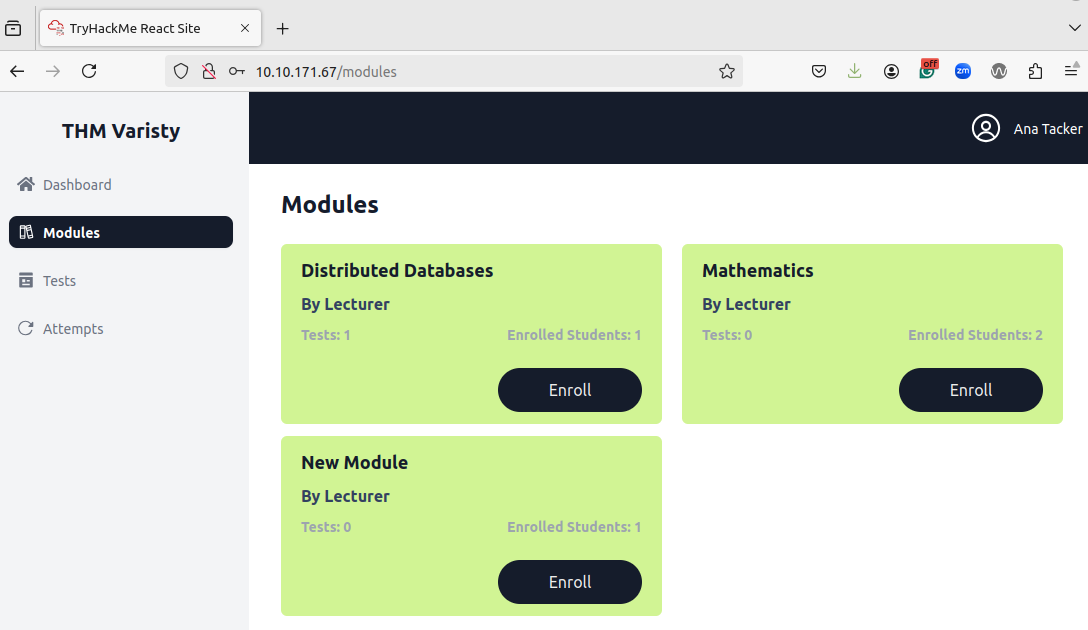
Using the menu navigation and reviewing the network traffic, we can see that session tracking is enforced through the cookie that is being transmitted with each request:
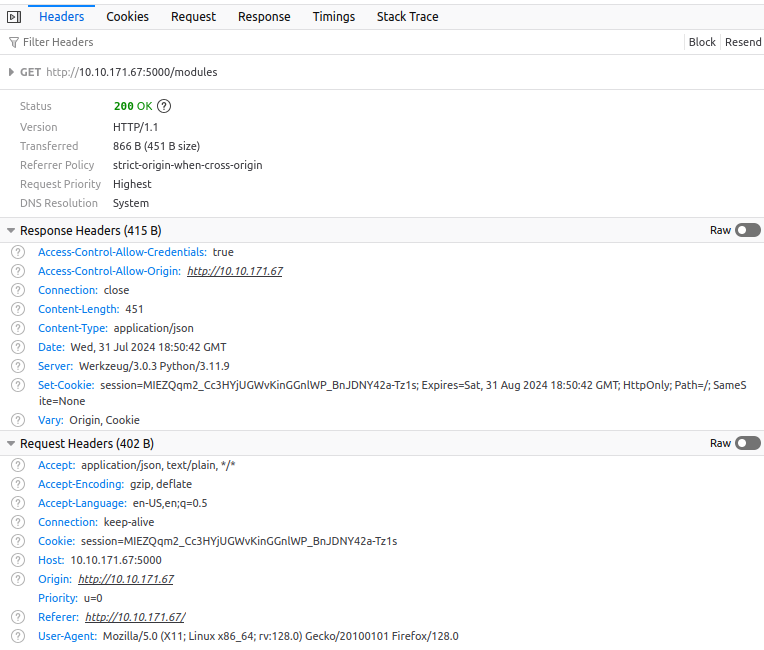
Note that your headers might differ slightly depending on which browser you use. However, an interesting thing to note is that even though the cookie expiry time has been reached, the same set cookie header is used to refresh the cookie to the exact same value. This might point to a persistent cookie. Let's see what happens when we remove this cookie. Under storage, remove the cookie and make the module request again:
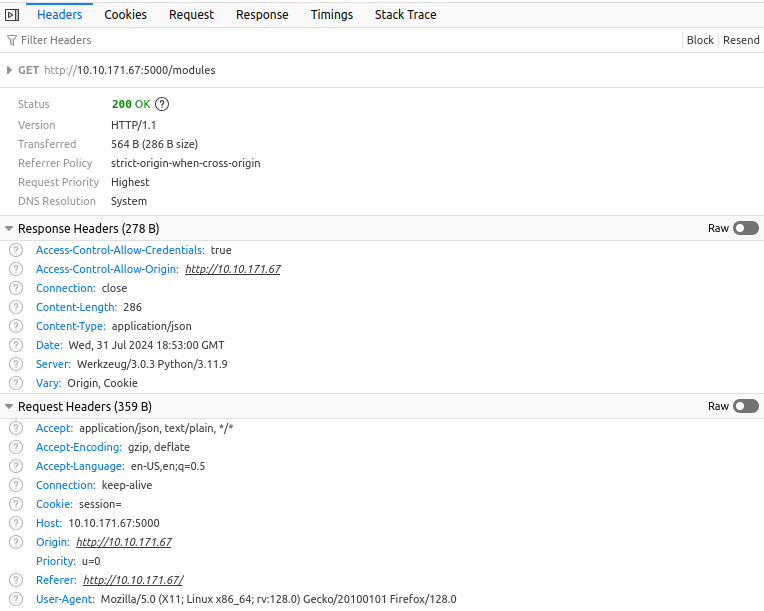
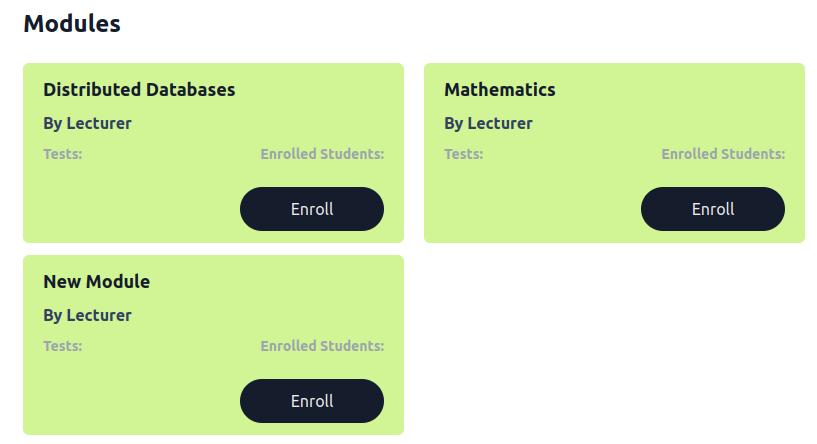
The request seems to still succeed? However, if you take a closer look, you will see that we can now only see the modules but not the number of enrolled students or the potential tests:
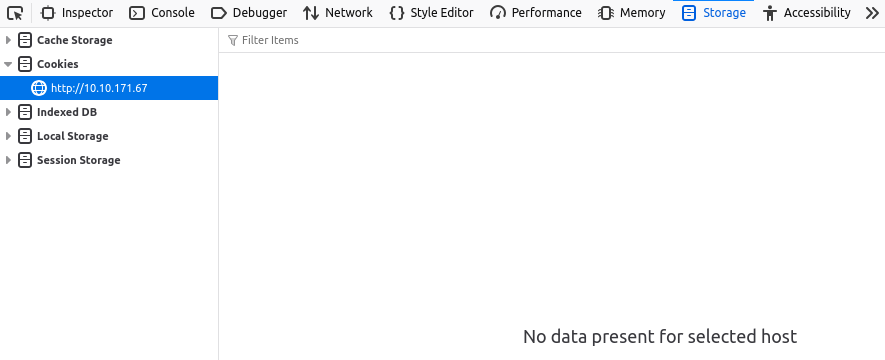
This tells us that we might need to do further investigation to determine exactly what we are allowed to access from a completely unauthenticated perspective. This would warrant further investigation to fully map out the session management lifecycle. However, we will keep things slightly simpler. Let's take a look at the logout functionality. Once we press the logout button, we can see that our session is removed client-side:
However, we should probably test if the session is also terminated server-side. You can re-authenticate to the application and replace your new cookie with your old cookie value. But, it does seem like the session termination is working to some capacity as you get a 500 Internal Server Error when you refresh the page. This does tell us that there is something wrong here, since an invalid session should not lead to an internal server error. Let's investigate.
Let's revisit some of our previous claims here. If we navigate to the Local Storage, we do notice quite a bit of data is being stored:
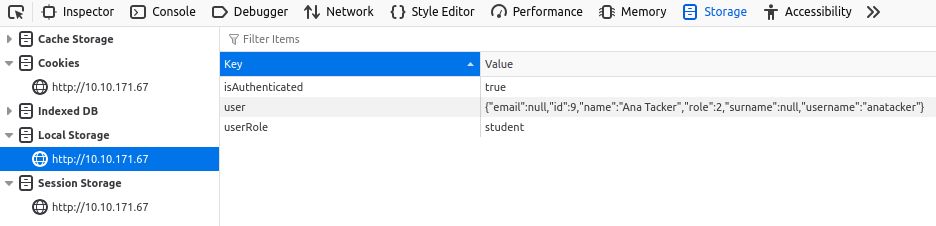
Let's play around by updating our userRole from student to lecturer and refreshing the page:
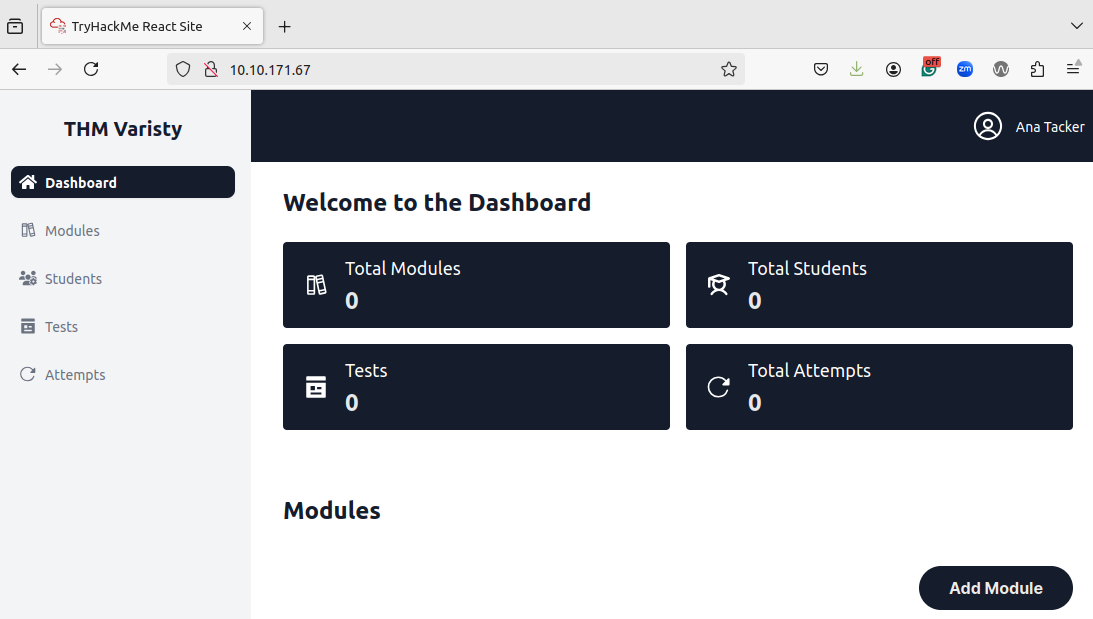
While we now have access to more tabs, it seems like we don't have access to more information since we can see any students or test attempts. Let's take this further by updating our role in the user value from a 2 to a 3. Sadly, this still gives us the same results. However, there are more values to play with here, such as our id and username. We will have to come back to this. However, this new information tells us that the sessions might be managed not purely through a cookie but through token information.
Now, we have mapped out the session management lifecycle. Let's take a look:
| Lifecycle Phase |
Observation |
| Session Creation |
A combination of cookie- and token-based session management is being used |
| Session Creation |
A new session value is provided for each login attempt |
| Session Creation |
The session value itself appears to be sufficiently random |
| Session Tracking |
Unauthenticated actions are not tracked via a session |
| Session Tracking |
The cookie is sent in each request for tracking |
| Session Tracking |
Several requests can be made without a cookie |
| Session Tracking |
The initial token values that are loaded post-authentication dictate the visible information |
| Session Expiry |
There is a mismatch between the client-side and server-side expiry times |
| Session Expiry |
The expiry time is incredibly long |
| Session Termination |
Users can forcibly terminate their session |
| Session Termination |
Sessions are terminated server-side but reusing an old session leads to an internal server error |
Given all of this information, we would already report the following vulnerabilities on a security assessment:
- Excessive Session Lifetimes
We would also need to investigate the following further:
- Access controls on all API endpoints
- Web application logs for the accountability of actions
¶ Exploitation
Given all of the information provided above, it seems like we need to do a little bit more exploring to see if we can access sensitive data. Using the information you learned about securing the session management lifecycle and the information of the mapped-out lifecycle, see if you can get access as a student to lecturer information and answer the questions below.