¶ Bug Bounty: Wordlists — Please do them properly.

·You are only so good as your weakest link. And in bug bounty, most people’s weakest link, and most ignored is always their wordlists. Every stage of bug hunting is dependent in some way or another on wordlists, and I’m afraid Seclist’s raft-medium-words-lowercase.txt isn’t going to cut it.

Today, we’re going to cover 6 things:
- You’re probably doing it wrong, and why you should care
- Exploit specific wordlists
- Context-aware/target-specific wordlists
- Parameter fuzz wordlists
- Directory brute force wordlists
- using wordlists efficiently and strategies
¶ You’re probably doing it wrong, and why you should care
Firstly, I’m guilty of this too, and I’ve already had much better results when I stopped this. But lots of people will install a tool, be it Amass, Ferox/gobuster, Arjun or anything else under the sun and they come with a prepackaged/default path wordlist. This is great because you can point the tool at a target and it just works, but this also means
a) you’re using the same wordlist as everyone else, and getting the same results as everyone else
b) The amazing developers that make these tools are tool makers, not wordlist curators, they will outsource this or package a wordlist once, and not update it with the tool, meaning you’re using outdated wordlists.
Most people have heard of, and use, wordlists from Seclists, which is a great set of wordlists for everyday use, but when you’re trying to find results before thousands of other bug hunters, you need wordlists which are better than average.

Seclist’s first commits were in 2012 which makes some of those wordlists over a decade old!
To get bugs before other people, and to find bugs you wouldn’t have beforehand, you need higher quality wordlists, and wordlists specific to the task you’re trying to complete.
¶ Exploit specific wordlists
Sometimes specific exploits, exposures or common areas of attack have known paths, for example, wp-config.php is a config file which exposes sensitive information and can be found at /wp-config.php, but the idea of an exploit-specific wordlist means instead of just fuzzing for /wp-config.php on every subdomain, we can curate a wordlist with paths where wp-config.php is not usually found. We can do this in two ways.
Firstly, we can do analysis on a massive dataset of GitHub using Google’s Big Query (More here https://cloud.google.com/blog/topics/public-datasets/github-on-bigquery-analyze-all-the-open-source-code) to find paths. By using a query like the following we can get a massive wordlist of paths which includes the wp-config.php string in the pathname on github.
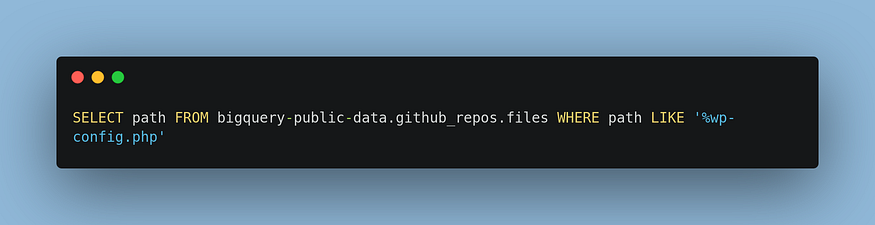
It’s important to note, Google Big Query provides free credit for a few queries but is not free. It is also important to note that the given database you will get, will include lots of obviously impractical paths, such as ones that include highly specific IDs or usernames — which will need to be cleaned.
Secondly, we can google dork for specific paths. Going back to our wp-config.php example, we can google for inurl:/wp-config.php and find out-of-scope assets with that exposure. We cannot exploit these obviously, however, we can use the non-standard paths we find to curate a wordlist which can be used on in-scope assets.

Lastly, you can create exploit-specific wordlists in the sense that every single item is a potential vulnerability or exposure, meaning any successful hit might be worth investigating. A good example of this is GodfatherOrwa’s 1.txt (https://github.com/orwagodfather/My-WordLISTs/blob/main/1.txt) — GodfatherOrwa has lots of good wordlists on their github you may wish to explore.
¶ Context-aware/target-specific wordlists
When hunting a specific target, you can make a wordlist bespoke to that client to increase your chances of finding interesting endpoints as developers often name things in relation to their company, environments and contexts.
When adding custom words to your own wordlist, think about things like:
- What tech stacks are they using? try adding techs to your wordlists
- What industry are they a part of? if you’re hacking an aeroplane company, try adding words related to aviation!
- What countries do they operate in or sell products in? Add things like country names or abbreviations.
- Do they have specific unique patterns in the URLs you can see? If you see
/companyName_storage, try adding words to your list that start with/companyName_ - Get creative with it! I’ve listed some here, but if you can think of more that’ll give you an advantage.
An easy way to get keywords related to your target is to go to their front page and pick out keywords, go to their “About Us” company page and do the same! Visit their Wikipedia page or anything else related to them.
¶ Parameter fuzz wordlists
Even a brand new wordlist is not good enough for a specific target! Directories and parameters are not the same and thus you’ll want to make one bespoke to your target for fuzzing parameters
The best way to do this is to start enumerating history URLs, using archive sites like the waybackmachine and common crawl, and web crawlers like Project Discovery’s Katana (perhaps follow this medium account for an upcoming blog on this tool 👀). Once you’ve done this extract the parameters via whichever cleaning methods you like, and then you’ll have a wordlist for parameters which have been previously observed on the target.
Now you have this, apply this wordlist to other subdomains using a tool like Arjun to find new endpoints which could be vulnerable.
¶ Directory brute forcing wordlists
Lastly, you need wordlists for brute-forcing directories. I won’t go into too much detail here as the prior sections cover large amounts of this section.
For a quick custom wordlist for directory brute forcing:
- gather URLs of a target as described in the prior section, then clean the wordlists to collect paths using something like
cat urls.txt | cut -d"/" -f4- | sed "s,?.*,," | anew - apply context-aware words, and also use the context-aware words to permutate the paths you’ve already found. for example, if you find the path
/admin/logintry adding paths like/admin-companyName/login
¶ Efficiency and strategy
When your profit is dependent on the bugs you find, the biggest cost becomes your time. Even if you have the best wordlists for the job, there are still ways to reduce the time that it takes to find things.
So, some miscellaneous tips to get the most from your wordlists and time:
- Use multiple wordlists when manually hunting! I may be looking for interesting endpoints on a list of 1000+ subdomains, but running your biggest wordlist on each one is going to waste a lot of your time. Especially for seemingly inconspicuous subdomains, it seems that if you can find an endpoint on one subdomain, it’s likely to have multiple. So run a smaller wordlist with common paths on it first to check if it’s worth your time with a big one.
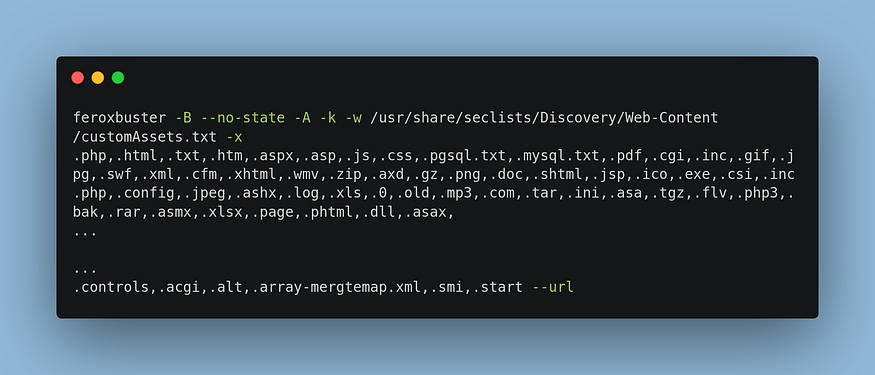
Use really small wordlists with lots of extensions to test for techstacks or available extensions on the subdomain. Especially when you find a /cgi-bin/ which usually contains scripts that allow for interesting functionality. I use the following feroxbuster command which contains almost every somewhat common extension I could find, with a custom small wordlist.
- Don’t bloat your wordlists. raft-medium-words-lowercase.txt is probably the most commonly used wordlist and yet it has items which will almost never be found like
komplettno,tht8h767r89h6yr, andlepetlf607787825. If you spend the time to trim the fat from your wordlist and only have relevant words, you will save significant time.
¶ Key takeaways
- Custom wordlists are essential to setting yourself apart and finding more bugs.
- You need different wordlists for different tasks or objectives
- Time is the biggest cost in bug bounty, custom wordlists cut down on this cost.